WITHINGS BLOOD PRESSURE MONITOR


The Blood Pressure Monitor from Withings connects directly to an iPhone, iPad, or iPod touch to display the user’s blood pressure measurement on the device’s screen. In addition to an option to take one or three measurements in a row, the monitor records data to the mobile device via a free app, which also includes graphing capabilities. Further, you can view information via a private account from a Mac or PC, as well as share and sync information with a physician in one click via numerous compatible services.
$129 | www.withings.com


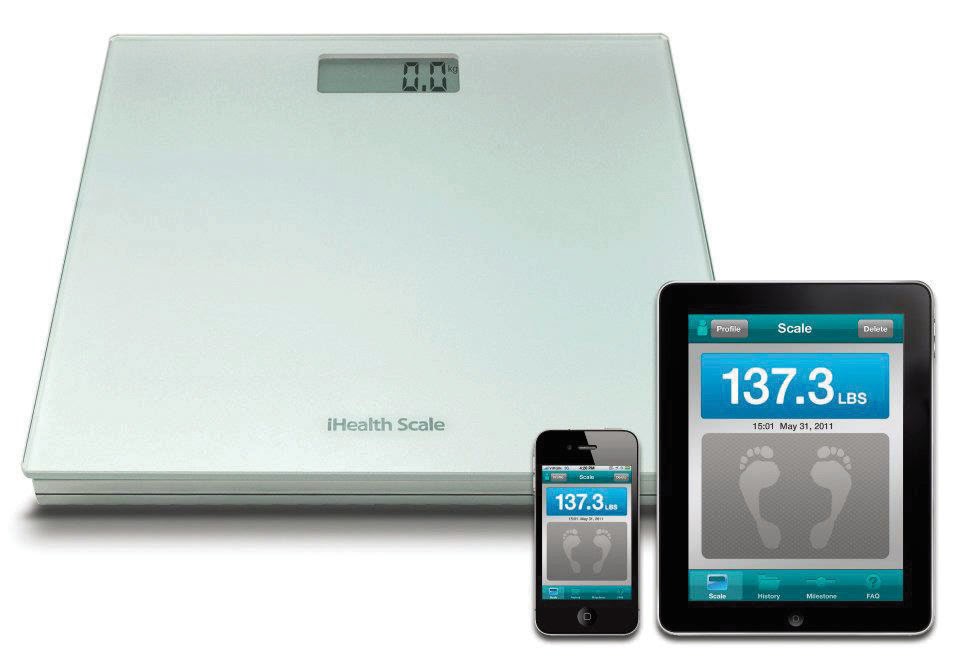
IHEALTH DIGITAL SCALE


Upon downloading iHealth’s free Digital Scale app to an iPod touch, iPhone, or iPad, you can step on the Digital Scale and it will send your weight measurements via Bluetooth to the app where it’s recorded. There you can organize and view your progress via personalized graphs, as well as set targeted weight goals via a Milestone feature. Further, you can email your weight-related information to a physician, family, and friends. The scale requires four AAA batteries.
$69.95 | www.ihealth99.com


IHEALTH BLOOD PRESSURE DOCK


iHealth claims its Blood Pressure Dock is the first blood pressure monitoring system for the iPod touch, iPhone, or iPad. Combining a dock that bundles a large or standard-sized monitoring cuff and a free BMP app, the system turns an Apple device into a blood pressure monitor that tests for blood pressure; records
relevant data; graphs data for interactive management; and shares data with family, friends, and medical professionals via email. Further, the dock can even charge your Apple devices.


$99.95 | www.ihealth99.com


iPhone Applications

WOWPITCH

iPhone | $4.99 | 1.3MB
If creating a 30-second “elevator pitch” to introduce yourself and your business while networking, job hunting, raising capital, and performing other functions isn’t one of your strengths, then WowPitch (Rel. April 3, 2012) from Speakout can help. In addition to providing key words meant to benefit your business, the app includes two pitch formats, unlimited editing, questions to ask, recording and playback abilities, email support, word counter, timer, and more.


ADAPTIVE SALES COACH

iPhone | $4.99 | 2.2MB
Absolute-North claims Adaptive Sales Coach (Rel. May 7, 2012) goes beyond the contact and task management features other sales systems use by “providing sophisticated tools that coach you to sell better.” A patentpending mobile coaching system walks users through “the process of developing a better targeted message.” Various features include tailored coaching based on personality and selling styles, personality based coaching, individual and company research data, contact support, in app call and email support, iCloud backup, and more.


Applications For Windows Phone

NOKIA READING

Windows Phone | Free
Nokia began rolling out its Nokia Reading app on a country-by-country basis in mid-May for Nokia Lumia
900, 800, 710, and 610 models. Initially available in France, Germany, Italy, Russia, Spain, and the UK, the app should be available in other countries by year’s end. Available from the Windows Phone Marketplace and sporting a night viewing mode, the app enables searching for, buying, and reading books in various languages on Lumia phones.


Smartphone Applications For iOS

MEETINGCALC

iOS | 99 cents | 3.1MB
Meeting Calc (Rel. Feb. 16, 2012), from developer Seth Taylor, does something your boss may or may not appreciate: keep tabs on the amount of time that employees sit in a meeting and how much money they earn doing so, whether the meeting proves beneficial or not. The app supports adding employees who arrive to a meeting late, and after a meeting is over you can share the total time and cost via email or Twitter.


INSTACAST

iOS | 99 cents | 4.6MB
If you’re a fan of audio and video podcasts but have been seeking a better way to manage and interact with your subscriptions, consider Instacast (Rel. May 26, 2012) from Vemedio. In addition to putting all subscriptions in one place and applying instant updates, the app includes  an advanced podcast player, supports wireless downloads, and works in the background. The latest version fixes a few bugs, includes free Smart Playlists, and offers improved performance for heavy use.


Tablet Applications For iOS

BIZXPENSETRACKER

iOS | $5.99 | 10.2MB


Whether you travel abroad or only in America, there’s a good chance that you struggle with tracking your expenses. Silverware Software’s Biz- XpenseTracker (Rel. June 6, 2012) app is packed with features that help you with that task. The app has a time tracking feature, so you can document the hours you worked. You can track your track your mileage by entering the total distance traveled or use the in-app odometer. You can easily track meals and other business- related expenditures, as well. BizXpenseTracker also lets you store the data from multiple trips for long term expense tracking.


ICAN-PRINT

iOS | Free | 16.6MB
Connecting your tablet to a PC to print photos and documents isn’t always a convenient or viable option. Teco Image Systems’ iCan-Print (Rel. May 2, 2012) cuts the need for a cable between your tablet and your computer, letting you print Microsoft Office, iWork, and PDF documents, as well as photos, from any Windows PC-connected printer. Download the iCan-Print app and install the PC client software on the computer you want to use. Although the app is free, you will have to purchase points to print when the free
trial prints run out.


JOT! WHITEBOARD

iOS | $4.99 | 7.4MB
Many companies like to use whiteboards to convey information or help visualize their employees’ ideas. But what do you do if half or all of your team are out of the office? Tabula Rasa’s Jot! Whiteboard (Rel. May 6,
2012) gives you the idea-generating power of the whiteboard in a tablet form where you can draw, type, or import a background photo. Initiate a Live Sharing session where all participants have access to the same whiteboard for real-time collaboration, and then save images to your tablet or send them to others via email.


HR AND EMPLOYEE MANAGEMENT ADVICE

iOS | Free | 6MB
Everyone can use a little advice now and again, including employees working in human resources. HR And
Employee Management Advice (Rel. May 14, 2012) from Docstoc is full of videos and other resources that will give you helpful tips about the interview process, advice about how to hire people for specific jobs and how to use wellness perks effectively, and much more. The app is a good quick access tool whether you are managing current employees or trying to hire new ones.


PEARL TREES

iOS | Free | 7MB
If you’ve ever wanted to go beyond the boring bookmarks folder or favorites bar, Pearl trees (Rel. May 2,
2012) from Broceliand SAS will be a nice addition to your tablet. You save links to websites, photos, videos, and any other forms of Internet content as pearls, and then you form them into pearl trees. You can organize pearls into separate pearl trees based on different content categories and then share those collections with other Pearl trees users. You can also use your Pearl trees account from your computer and add new pearls as necessary.


PREZI VIEWER

iOS | Free | 12.7MB
Prezi presentations are extremely unique visual aids that can spruce up almost any meeting. But until now, you couldn’t experience the presentation-creation software in full on tablets. Prezi Viewer (Rel. April 28, 2012) lets you view and revise your Prezi presentations without you having to do so from a computer. You can drag and pinch the screen to zoom in on certain portions of the presentation to make sure every piece looks exactly right.


VABLET

iOS | $9.99 | 14MB
Viewing sensitive data on a tablet is a risky proposition, and many companies simply aren’t sure how to handle this situation. Vablet (Rel. May 24, 2012) from Meiotic makes viewing internal files on mobile devices safer by pushing content to tablets without having to connect directly to the internal network. Vablet gives you complete control over access and security by allowing the administrator to revoke access at any time. This gives you time to view the files and complete any necessary tasks. Then, the file can be safely removed from the tablet and out of reach of hackers and other threats. 


Cooler Master CM Storm QuickFire Pro


From a purely aesthetic point of view, Cooler Master’s CM Storm QuickFire Pro mechanical gaming
keyboard is sleek, with a matte black exterior, striking red LED backlighting, and Cooler Master’s signature
font emblazoned on every key. And although the LED backlighting could be seen as an aesthetic feature, as well, it also adds to the keyboard’s overall functionality.


In fact, one of the first things we tried out when we plugged in the CM Storm QuickFire Pro was its set of three adjustable backlight modes— Gaming Cluster, Extended Gaming Cluster, and Extended Gaming Cluster (Breathing). Gaming Cluster lights up the WASD and arrow keys; Extended Gaming Cluster adds even more; and the “breathing” mode makes the backlighting brighten and dim in a rhythmic fashion. Cooler Master’s approach to the keyboard’s backlighting gives gamers quick reference and access to the exact keys they need.

      Cooler Master also added a variety of other features designed specifically for gamers; most of them are tied to the Function Lock key, which you should familiarize yourself with right away. This key lets you to change the backlighting mode, disable Windows keys, switch between 6N Key mode or Full N Key rollover mode, and access the multimedia playback keys and volume controls. The Function Lock key also lets you adjust the USB polling rate of the keyboard, giving you the options of 125Hz (8ms), 250Hz (4ms), 500Hz (2ms), or 1,000Hz (1ms). With all of these features, it’s simple to tune the keyboard to your specific needs.
      There’s no doubt that the QuickFire Pro packs a punch in the design and feature categories, but it’s also a solidly built mechanical keyboard with highly responsive Cherry MX keyswitches. (The model we reviewed used Cherry MX Browns, but Cooler Master also offers Black, Blue, or Red keyswitches in certain regions.) It provides that satisfying “click” response mechanical keyboard enthusiasts have grown to love without being too loud.
     Going back to the QuickFire Pro’sdesign, we quickly noticed how durable and well put together it feels. The keyboard has quite a bit of weight to it. The braided USB 2.0 cable is also detachable, which adds to its mobility. Everything about the CM Storm QuickFire Pro is designed to give gamers and enthusiasts the best possible experience without getting in the way of it. We enjoyed the amount of customization options Cooler Master built into this keyboard and we think you’ll take advantage of the multiple backlighting modes to illuminate the keys you need during intense gaming sessions.

CM Storm QuickFire Pro


$99.99
Cooler Master
www.coolermaster-usa.com


Antec ISK110 VESA


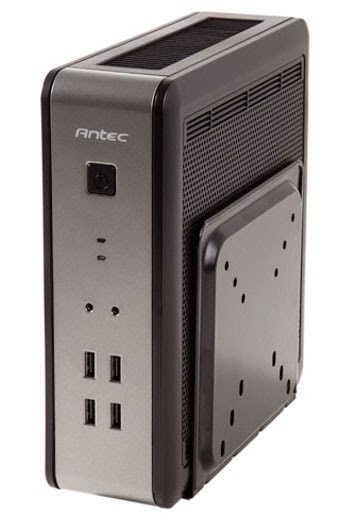
Small form factor computing has come a long way in the last several years, with Mini-ITX motherboards featuring USB 3.0 ports, 6-channel or better audio, and support for enthusiast CPUs and PCI-E graphics cards. SFF cases, on the other hand, have more or less lagged. Antec sent us its ISK110 VESA, a Mini-ITX case that goes a long way toward changing our minds.


This case is amazingly small, measuring just 8.7 x 3.1 x 8.4 inches (HxWxD). If you’re the type who would rather have the computer completely out of sight, then you’ll appreciate the VESA mounting bracket that Antec bundled in. You can mount the bracket onto the back of a TV or monitor to get it completely out of the way. According to Antec, this case is ideal for corporate builds, kiosks, and digital signage, but we can also see this system working well in entertainment centers for HTPCs.

      If you’re more inclined to show off your PCs (like we are), then you’ll be glad Antec included a stand, which is angled slightly back to give the case a proud stance. Four rubber feet make sure you won’t scratch up the surface of your desk or TV stand. The fully assembled case feels incredibly sturdy, and its industrial aesthetic will look just as attractive beside to your TV or near your monitor. The case features a steel inner frame surrounded on three sides by plastic panels, the front of which is silver. The front panel sports a power button, power and HDD LEDs, mic and line out jacks, and a quartet of USB 2.0 ports. The top panel consists of a plastic frame and a large metal mesh vent designed to help with cooling such crowded parts. Under the motherboard tray, you’ll find a bracket that supports a pair of 2.5-inch SSDs or hard drives.
       The top edge of the case features an internal DC-DC power converter, which connects to an external 90- watt notebook-style power supply. In addition to the 24-pin motherboard power connector, the internal cable bundle consists of a pair of SATA power connectors, a 4-pin CPU power connector, and a lone 4-pin Molex connector. That’s not enough juice to run a discrete graphics card with much gaming ability, but any modern Intel or AMD CPU with integrated graphics will be more than adequate for most general computing tasks.
        The ISK110 VESA is another example of Antec’s solid craftsmanship, and we’re happy to call this one of the better Mini-ITX cases we’ve ever tested. If small is your thing, then the ISK110 VESA should be on your short list.

ISK110 VESA
$94.95
Antec
www.antec.co


Cooler Master CM Storm Sentinel Advance II


If you could design your own gaming mouse, where would you start?

You’d probably choose a comfortable shape, because you’ll be spending lots of time using it. Once you know your hand will be pampered, you’d probably want to make sure that the mouse’s surface was covered with some sort of non-slip material so that you are always firmly in control, no matter what. You’d then want to make sure that your gaming mouse was capable of providing you with pinpoint accuracy, maybe with DPI settings that you could adjust quickly and easily on the fly from 200 to 8,200dpi. You’d add plenty of programmable buttons (say, maybe, eight) and an easy-to-manage profile system that you could use to set up control sets for your favorite games, and you’d build in a scroll wheel with a solid stepping motion so you could quickly and accurately change weapons when every second matters.


     Once you had all of these things squared away, you’d be ready to design a good look for your mouse. A dark outer shell would make sense, but you might want to spice things up a little with LED accents. Maybe you’d design LED controls in your mouse’s setup app to allow you to choose from among seven colors, and if you were really feeling frisky, you might build in the ability to make those lights pulse or flash. You’d want to add a cord, naturally, and you’d probably pick a high-quality, braided cord so that it will never tangle or bind.


At that point, it’s fair to say you’d have a pretty good gaming mouse, right? What if you went beyond all of that and added an insane amount of configuration settings— settings to let you adjust details such as
your mouse’s USB polling rate, button response times (with specific response times for each button, if you want), and doubleclick speed? You might even add the ability to program control macros and scripts into your mouse via an easy-to-use software interface and then give your mouse 128KB of onboard memory to 
store said programs.
     You could probably do all of this, provided you know where to get all the parts and how to put them together without soldering your finger to the PCB, but it would cost you a pretty hefty chunk of cash and it would take a lot. Of. Time.
      Or, you could pick up a CM Storm Sentinel Advance II from Cooler Master for less than 60 bucks and have it running your favorite games in the time it takes to tear open the box.

CM Storm Sentinel Advance II
$59.99
Cooler Master
www.coolermaster-usa.com


ZOTAC GeForce GTX 670 AMP! Edition


Can’t get your hands on the GeForce GTX 680? Don’t fret, the GeForce GTX 670 is NVIDIA’s next best thing, and it delivers impressive gaming performance without inducing sticker shock. ZOTAC sent us its GeForce GTX 670 AMP! Edition to use in the LAN Party Boxster.